ppPalette <- ptr_define_placeholder_value(
  keyword = "ppPalette",

  build_ui = function(node, label = NULL, selected = NULL, ...) {
    shiny::selectInput(
      node$id, label = label %||% "Palette",
      choices  = c("Set1", "Set2", "Dark2", "Paired"),
      selected = selected
    )
  },

  resolve_expr = function(value, node, ...) {
    if (is.null(value)) return(NULL)
    value
  }
)

ptr_app(
  ggplot(iris, aes(x = ppVar("Sepal.Length"), y = ppVar("Petal.Length"), color = ppVar("Species"))) +
    geom_point() +
    scale_color_brewer(palette = ppPalette())
)6 Your First Custom Placeholder
The five built-in placeholders are themselves registered through the same public API you are about to use. You define a placeholder by calling one of three constructors, keyed by the role from Chapter 3:
ptr_define_placeholder_value()— produces a self-contained value;ptr_define_placeholder_consumer()— needs the upstream data’s column names;ptr_define_placeholder_source()— produces the data frame the rest of the formula reads.
This chapter builds a working value placeholder out of the three required pieces and nothing else. The consumer and source roles are deltas over the same surface (Chapter 7); the constructor’s full argument set — validation, formula seeding, extra named arguments, plain-R meaning, copy defaults — is the reference chapter Chapter 8. Two facts hold everywhere:
- The registry is process-global. Calling a constructor registers the keyword as a side effect (and returns a plain-R stand-in function — what that stand-in means outside
ptr_app()is covered in Chapter 8); there is noplaceholders =argument to thread anywhere. Register once near the top of your script, then use the keyword in any formula. - The keyword you register is the keyword you write in the formula. By convention built-ins use the
ppprefix, but yours need not.
6.1 The need: a widget the built-ins don’t have
Suppose your app’s viewer should pick a color palette. ppText would hand them a free-text box — and "set1", "Set 1", and "Blues " all silently break the plot. What you want is a dropdown with exactly four valid choices. No built-in renders that; in about twenty lines you can:
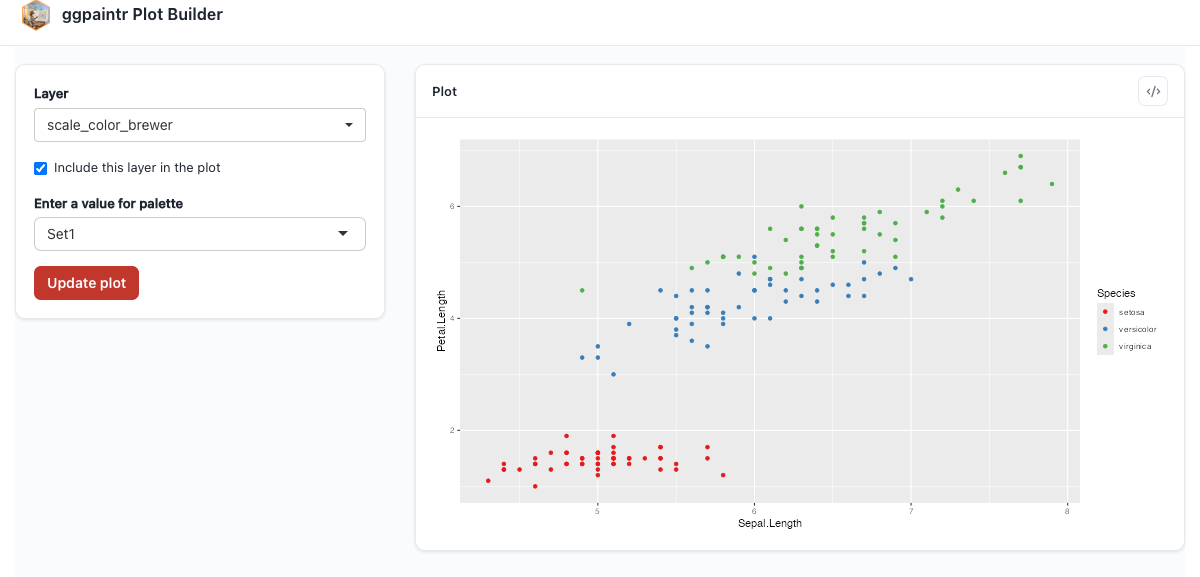
ppPalette in action: the Layer dropdown switched to scale_color_brewer shows the new palette select, and the drawn plot uses the chosen brewer palette.6.2 The three pieces
keyword is the name to register and to write in formulas. Required.
build_ui returns the Shiny control. Its first argument is node (required), and node$id is the input id you must give your widget — use it, and only it, without namespacing it yourself; the framework already did. The other arguments come from the framework: label (the widget’s resolved copy) is always passed, and selected (the value to show — the formula’s seed on first render, the user’s live input afterwards) is injected only when your function can receive it. Name the arguments you use and keep ... to swallow the rest — that is the safe, forward-compatible shape, and it guarantees the always-passed label has somewhere to land. Seed the widget from selected and only selected; when it is empty, render the widget empty rather than inventing a fallback, because a hardcoded fallback snaps a user-cleared widget back to the default on the next re-render. (Boot defaults belong in the formula — Chapter 8 shows how a placeholder opts into ppPalette("Dark2")-style seeding.)
resolve_expr is the way back: function(value, node, ...) receives the widget’s current value and returns what gets spliced into the plot call. Returning the string "Set2" is exactly right here, because scale_color_brewer(palette = ...) takes the palette name as a string. Return NULL to contribute nothing — the framework then drops the argument cleanly from the generated code (Chapter 5).
That round trip — widget value in, code fragment out — is the entire mental model. Everything else in the constructor’s surface is refinement: rejecting bad input before it reaches the plot, accepting seeds and extra arguments from the formula, controlling what the keyword means as plain R, and theming the copy. All of it is Chapter 8.
6.3 Where to go next
- Chapter 7 makes a placeholder data-aware (a column multi-picker) and lets one produce the data itself.
- Chapter 8 is the full reference for every constructor argument, common pitfalls, and unregistering.
- The gallery uses three custom placeholders in realistic apps: Chapter 20.