custom_text <- ptr_ui_text(list(
  shell = list(
    title       = list(label = "Iris explorer"),
    draw_button = list(label = "Render")
  ),
  params = list(
    x     = list(ppVar  = list(label = "X variable")),
    title = list(ppText = list(label = "Plot heading"))
  )
))

ptr_app(
  "ggplot(iris, aes(x = ppVar, y = ppVar, color = ppVar)) +
     geom_point() +
     labs(title = ppText)",
  ui_text = custom_text
)17 UI Text and Copy
Every label, placeholder, and help string in the generated UI comes from a deep-merged copy-rules tree. ggpaintr ships defaults; you override any subset by passing ui_text = to any entry point (ptr_app(), ptr_ui() / ptr_server(), ptr_shared()). Only the keys you spell out change — everything else stays at its built-in value.
17.1 The six override sections
| Section | What it controls |
|---|---|
shell |
Outer chrome — app title, draw / draw-all buttons, layer picker label, data / controls subtab labels. |
upload |
The ppUpload widget — nested file and name entries carrying the file-picker label and the optional dataset-name label / placeholder / help text. |
layer_checkbox |
The “include this layer” toggle on each layer panel. |
defaults |
Per-keyword copy defaults — one entry per registered placeholder, including custom ones (auto-populated from each registration’s ui_text_defaults). |
params |
Per-parameter overrides — copy that applies when a placeholder appears as the x, color, title, alpha, … argument of a layer. |
layers |
Per-layer overrides — copy scoped to one placeholder occurrence inside one specific layer call (e.g. the positional ppExpr of facet_wrap()). |
The first three sections have fixed lookup paths: layer_checkbox is a single leaf, upload nests one level (file, name), and shell holds one leaf entry per chrome slot plus four plain-string keys for shared-controls copy (shared_section_title / shared_section_hint, shared_panel_title / shared_panel_hint). The last three are nested by keyword — and, for layers, by layer name × keyword × parameter — letting you scope an override to a single placeholder, a single parameter, or a single layer.
17.2 Merge precedence
When the runtime needs the copy for a control (the widget for one placeholder occurrence in one layer), it deep-merges three rules in order:
defaults[[keyword]]— most general.params[[param_key]][[keyword]]— keyed by the surrounding parameter name.layers[[layer_name]][[keyword]][[param_key]]— keyed by the layer the placeholder lives in.
Each later rule wins on fields it specifies; fields it omits fall back to the earlier rule. For the other UI slots (chrome, upload widget, layer checkbox) the resolution path is fixed — the override either replaces a leaf field or does not.
17.3 Building overrides
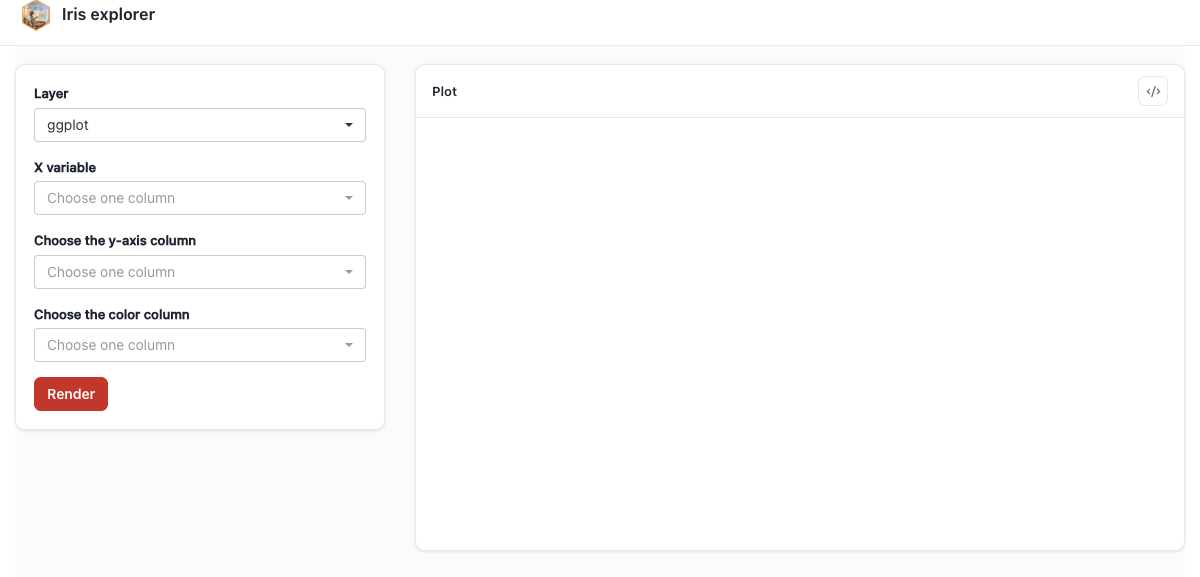
ptr_ui_text() validates the partial override and returns a fully-merged object. Passing the bare list works too — the entry points call it internally — but wrapping explicitly catches typos in section keys at construction time rather than at render time.
17.4 The low-level lookup
ptr_resolve_ui_text(component, keyword, param, layer_name, ui_text) is the lookup the runtime uses to fetch the resolved copy for a single UI slot. Embedders writing custom UIs that mix ggpaintr-driven labels with their own copy can call it directly — the wrapper in Chapter 16 uses it to resolve its page title — but most users never need it.
17.5 Where custom placeholders fit
A custom placeholder’s registration-time ui_text_defaults (Chapter 8) populates its entry in the defaults section, so app authors can re-copy your widget through the same ui_text = machinery without touching your code — the {param} interpolation included.