ptr_app("
ggplot(iris, aes(x = ppVar('Sepal.Length'), y = ppVar('Sepal.Width'))) +
geom_point() +
labs(title = ppText) +
facet_wrap(ppExpr)
")5 The Generated Code and Plot
Every ggpaintr app can show its work. The </> toggle in the plot pane opens the generated-code window: the exact ggplot2 (and dplyr) code that produced the current plot, with every placeholder replaced by the user’s committed input. Two views are offered — Final code, the runnable script you can copy straight back into R, and Spec, the restore values that reproduce the current widget state via ptr_app(..., spec = ) (Chapter 4). A Copy button does what it says.
This round trip is the point of ggpaintr for teaching: a student explores with widgets, then walks away with the code that does the same thing without the app.
5.1 Empty inputs clean themselves out
A placeholder that resolves to “missing” — an empty ppVar pick, a blank ppText, a cleared ppNum — drops its argument from the generated code. When that leaves an empty call whose name is in ggpaintr’s curated cleanup list, the whole call disappears too:
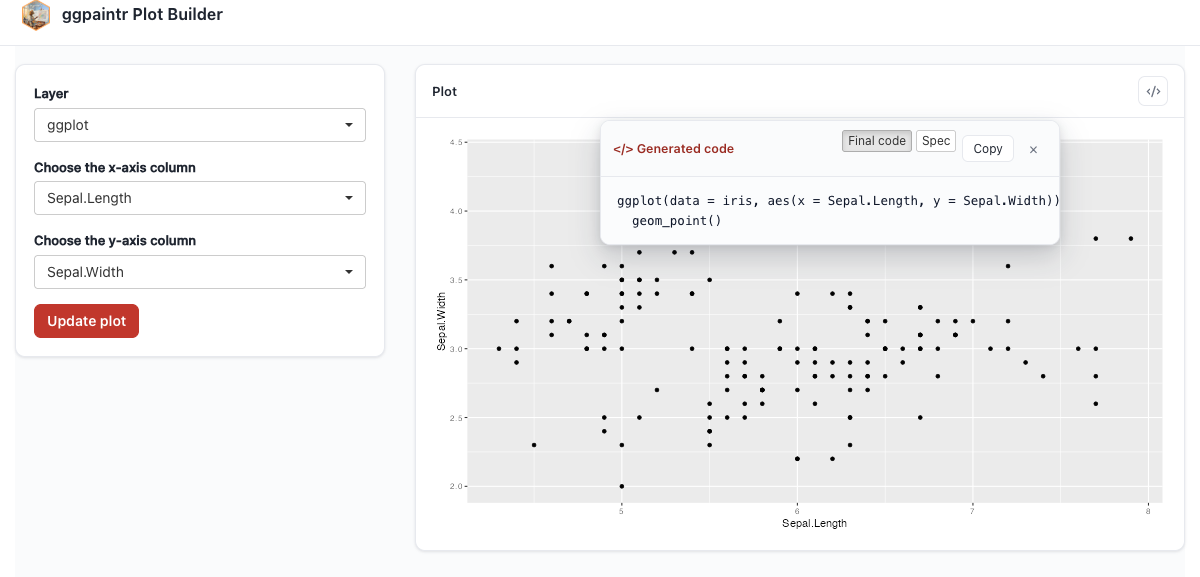
ggplot(data = iris, aes(x = Sepal.Length, y = Sepal.Width)) + geom_point() — the empty labs() and facet_wrap() vanished.The cleanup list spans ggplot2, dplyr, and the rest of the core tidyverse (tidyr, tibble, purrr, stringr, forcats, lubridate, and more). On the ggplot2 side that includes theme(), labs(), xlab / ylab / ggtitle, facet_wrap / facet_grid / facet_null, xlim / ylim / lims, expand_limits, guides, annotate, and the empty mapping helper aes(); an empty filter(), mutate(), or select() vanishes the same way. Third-party helpers (e.g. pcp_theme() from ggpcp) are not on the list — absence is the “removal safety unknown” signal. Pass safe_to_remove = c("pcp_theme") to opt a specific name into the cleanup pass. A ppExpr whose user typed an expression always wins: whatever was typed is honoured verbatim, even if its top-level name is in safe_to_remove.
5.2 Column names the generated code can actually use
ppVar placeholders need syntactic, unique column names — Sepal.Length is fine, "Sepal Length" is not. If your local data has spaces, reserved words, or duplicate names, pipe it through ptr_normalize_column_names() before referencing it from a formula. This chunk really runs:
library(ggpaintr)

messy <- data.frame(
  check.names = FALSE,
  "first column" = 1:3,
  "if"           = 4:6
)
clean <- ptr_normalize_column_names(messy)
names(clean)
[1] "first_column" "if_" Uploaded data (Chapter 3) goes through the same normalization automatically; the manual call is only needed for data already in your R session. ?ptr_normalize_column_names documents the exact rules (runs of non-alphanumeric characters become _, duplicates are de-duplicated with _-numbered suffixes, and reserved words get a trailing _ — so "first column" becomes first_column and "if" becomes if_, exactly as the chunk above prints).
5.3 Reading the plot and code programmatically
The code window is the interactive face of two exported helpers, ptr_extract_code(state) and ptr_extract_plot(state), which read the same artifacts off a running app’s state object. They only make sense once you own the server side of the app — that story starts at Chapter 9, and Chapter 13 uses them to feed plotly and friends.