formula <- "ggplot(iris, aes(ppVar, ppVar, color = ppVar)) + geom_point()"

ui <- shiny::fluidPage(
  shiny::titlePanel("My host app"),
  ptr_ui(formula)
)
server <- function(input, output, session) {
  ptr_server(formula)
}

shiny::shinyApp(ui, server)9 Embedding with the Default Layout
NoteThis part assumes Shiny basics
From this chapter on, you write the surrounding Shiny app yourself — fluidPage(), a server function, shinyApp(). Nothing before this part needed Shiny; if the all-in-one ptr_app() covers your use, the earlier parts are all you need.
L2 is “I already have a Shiny app and want to drop a ggpaintr-driven block somewhere inside it, keeping ggpaintr’s default layout.” Every L2 function is self-contained — it owns its own .ptr-app theme scope and bundled asset dependency, so it drops straight into a host page with no scaffolding. This is the self-contained half of the naming convention; the bare pieces (ptr_ui_page, ptr_ui_controls, ptr_ui_plot, …) are L3 (Chapter 12).
| L2 function | Role |
|---|---|
ptr_ui(formula, id = NULL) / ptr_server(formula, id = NULL) |
One self-contained default-layout block (controls + plot/code/error), namespaced by id. |
ptr_shared(formulas, ...) → obj |
The shared coordinator: a pure object built once from the full formula set. Multi-instance only. |
ptr_shared_panel(obj) |
The one standalone cross-formula shared panel (self-contained). |
ptr_shared_server(obj) |
The reactive bundle threaded into each module via shared_state =. |
There is no free-form controls-here / plot-there split at L2: the only default-layout block is the self-contained ptr_ui() / ptr_server() pair. Placing the controls in one region and the plot in another — or replacing a built-in pane with your own renderer — is L3, covered in Chapter 12 and Chapter 13. L2 is strictly “default layout, dropped into your app.”
9.1 The pair
Controls and outputs live next to each other inside the module’s namespace. The id is not required if there is only one ggpaintr module in the app:
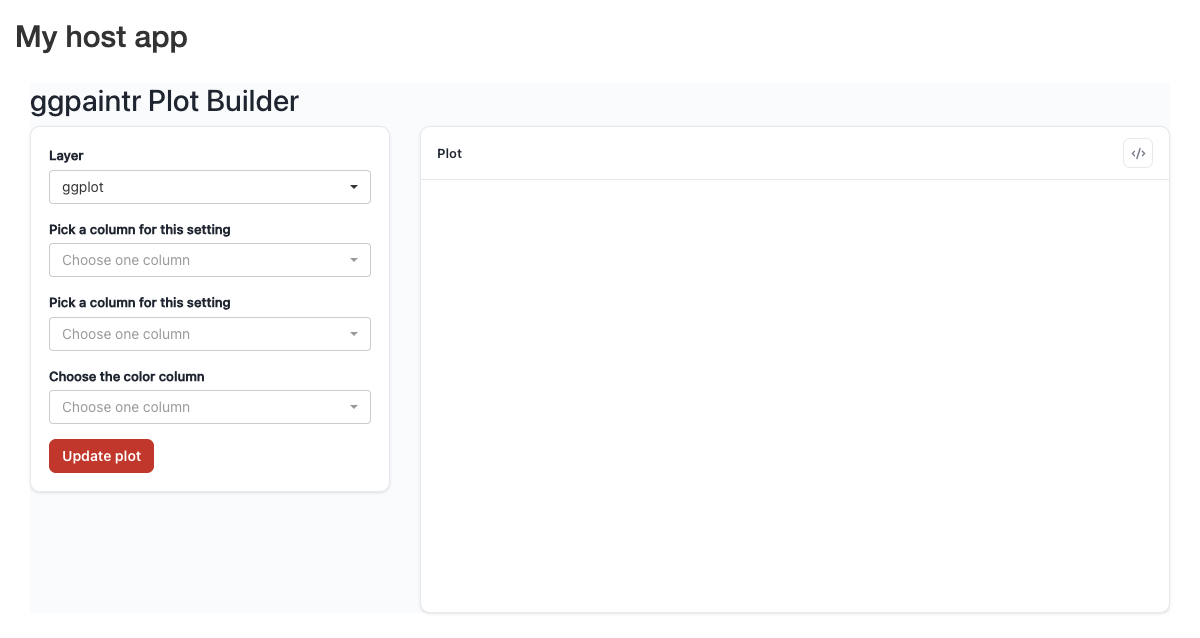
titlePanel. The block brings its own theme scope and assets.9.2 What ptr_server() gives you
ptr_server() returns the app’s state object — embedders that want to react to it (inject layers with ptr_gg_extra(), or read the live plot and code via state$runtime()$plot / state$runtime()$code_text inside a reactive context) capture the return value; otherwise the side effects are all that matter. The one-shot readers ptr_extract_plot() / ptr_extract_code() are isolate()-wrapped — reserve them for non-reactive contexts (download handlers, tests), not render*{} blocks. Its ... are forwarded, so ui_text =, expr_check =, and safe_to_remove = are available here exactly as on ptr_app(); the shared-binding arguments (shared_state = and friends) are also accepted, going beyond what ptr_app() offers. Boot-state still lives in the formula: write ppLayerOff(geom_X(), TRUE) to start a layer unchecked (Chapter 15).
9.3 Several linked blocks
Two or more ptr_ui() / ptr_server() blocks with a control shared across them is the coordinator pattern — ptr_shared() + ptr_shared_panel() + ptr_shared_server(). The full contract, including the partition rule, is Chapter 11; the layout mechanics are Chapter 10.
9.4 Restyling the block
ptr_ui() accepts the same css = argument as ptr_app() — see Chapter 15 for the stable class vocabulary and injection rules.